


Both Cinema4D and Blender are amazing 3D tools. We chose C4D and this is why you might also consider doing the same.
No offense to Blender or the thousands of artists that use it every day to create amazing work. Even though this is a Vs. type article, both tools are capable in their own right, and have been used professionally for many years.
In this fast paced world where learning Digital Content Creation (DCC) tools seems to be a never ending process, we chose Cinema 4D. Why? Read on to find out!
The Professional Edge: Why Choose Cinema 4D Over Blender for 3D Design
In the realm of 3D modeling, animation, and visual effects, choosing the right software can significantly impact the quality, efficiency, and outcome of your projects. Two prominent contenders in this field are Cinema 4D, developed by Maxon, and Blender, an open-source powerhouse. This article dives deep into why professionals might lean towards Cinema 4D, highlighting its specialized tools, user-friendly interface, and integration capabilities that cater specifically to professional use.
My experience with both applications goes back decades, and while I don’t profess to be a master of either Cinema 4D or Blender, I have a wide range of experience with both from a historical perpective, covering them, writing about them, and keeping my finger on the pulse of both their respective user bases and professional achievbments.
As someone who has used or evaluated almost every 3D application you can name from 1994 to present day, one factor in particular has been become ever more critical; that of learning curve, and consequwently, ease of use. The computer graphics industry moves so quickly, the very idea of spending months (or more) learning new software applications has become more important to me than ever before. It’s simply not sustainable to learn it all, and the time it takes to get up to speed and be productive with software today, is mission critical.
Interoperability with other software programs is also a major factor I take into account, and Maxon has had a long history with Adobe especially, working to integrate their tools into apps like After Effects, Premiere and others. Cinema 4D is also working with Adobe to more closely integrate with the Substance line of 3D tools, and the combination is getting better all the time.
Maxon has been in this field since 1986, is headquartered in Germany, and they’ve been rabid supporters of the 3D and DCC space for almost four decades. While Blender began its life in 1996, it took many years for it to develop into a truly usable piece of software, and the way it’s built in Python makes it flexible, but slower overall.
User Interface and Workflow
Ease of Learning: Cinema 4D is often praised for its intuitive graphical user interface (GUI), which is particularly welcoming to beginners, yet deep enough for the most seasoned professionals. The software’s design philosophy centers around simplicity and efficiency, making it less daunting for those new to 3D software. According to reviews from many pros, Cinema 4D’s interface provides a more streamlined experience for users, allowing them to become fluent in navigating and utilizing the guts of the software with a few days of practice. This contrasts with Blender, which, while powerful, has a steeper learning curve due to its more complex user interface layout, and the myriad tools available to customize it, making it harder to follow along with a lot of tutorials. The consistency of the UI in Cinema 4D (even though highly customizable itself) allows for users to more easily follow along with learning materials.
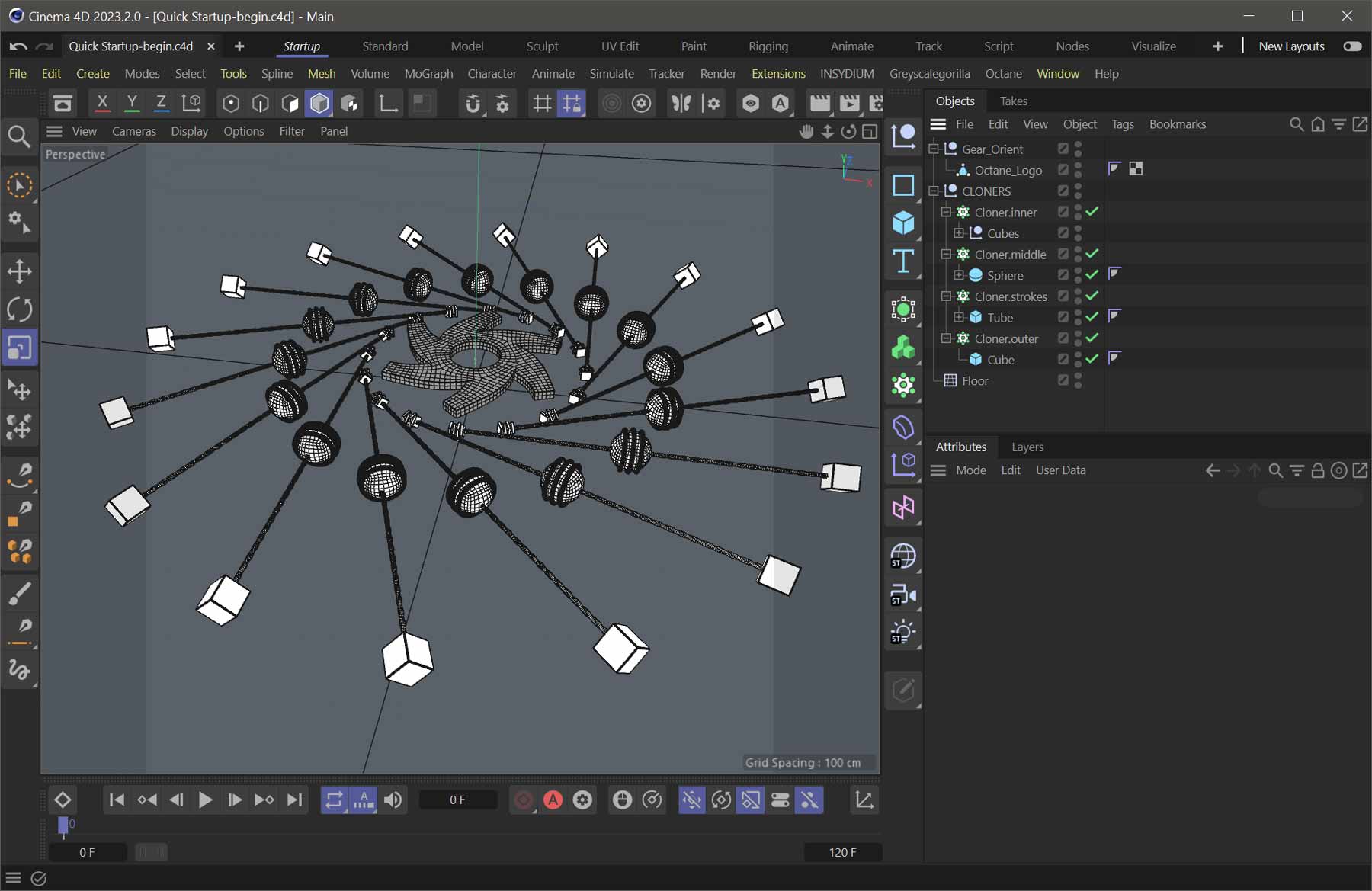
Workflow Efficiency: Cinema 4D’s workflow is structured to reduce clutter and enhance productivity. Features like the Object Manager and the tagging system allow for quick organization and access to elements within a scene. The drag-and-drop capabilities further simplify the process of arranging objects and effects. GarageFarm, a 3D software rendering service, notes that Cinema 4D’s procedural workflow offers flexibility, and its updates are rigorously tested, ensuring a stable experience. The Blender interface, on the other hand, can become easily cluttered with complex scenes, and its workflow might feel less organized without the same level of intuitive management tools.
Rendering Capabilities
Superior Render Engines: Cinema 4D excels with its variety of rendering options. It comes with its native Physical Renderer but also includes the top-tier rendering engine Redshift, and also supports V-Ray, Octane, and Arnold third party rendering engines. These engines are industry standards in professional settings for achieving high-quality, photorealistic results. According to Sculpteo, this capability is vital for projects requiring top-notch visual fidelity, such as in film production or high-end architectural visualizations. Blender’s rendering primarily relies on Cycles and Eevee, with the latter less favored for professional output due to its real-time focus.
Rendering Time and Quality: The integration of these advanced rendering engines in Cinema 4D not only enhances the quality of output but can also optimize rendering times thanks to their GPU acceleration capabilities. For professionals, this translates to quicker turnaround times for projects without compromising on visual quality. Blender has made strides with Cycles supporting both GPU and CPU rendering, but it lacks the breadth of high-performance rendering solutions out of the box, which are built natively into Cinema 4D.
Motion Graphics and MoGraph
MoGraph Toolset: One of Cinema 4D’s standout features for professionals in advertising, broadcast, and film is the MoGraph module. This toolset is unparalleled for motion graphics especially, offering an intuitive, comprehensive suite for creating complex animations, effects like flying logos, transforming texts, and kinetic typography. InspirationTuts highlights how MoGraph has become a go-to for professional motion graphics, particularly noted for its ease of use in creating dynamic, visually appealing graphics. These capabilities and more extend beyond motion graphics, and are used in production for many purposes today.
Comparative Complexity: While Blender does have tools for motion graphics, they don’t hold the same reputation or ease of use as Cinema 4D’s MoGraph. Professionals often find Blender’s approach more technical and less streamlined for motion graphics tasks, requiring additional setup or plugins to achieve similar results. This makes Cinema 4D’s workflow particularly appealing for those whose primary output is motion graphics.
Real-Time 3D: The Future
Integration with Real-Time 3D in Unreal Engine
-
Real-Time Workflow: By using Cinema 4D’s ‘Save for Cineware’ command, artists can bake complex procedural motion graphics into real-time scenes via Unreal Engine’s Sequencer, enabling quick iterations and real-time previews without long render times.
-
Asset Portability: NFL Media, for example, has leveraged this integration to bring pre-rendered graphics directly into Unreal, aiming for a real-time control room environment, as noted by Patrick Lee, Director of Real-Time Systems at NFL Media. This not only saves hours of rendering and quality control time but also storage space.
-
Enhanced Motion Graphics: The combination of Cinema 4D’s MoGraph tools with Unreal Engine’s capabilities allows for dynamic, interactive motion graphics that can respond to real-time data or user interaction, which is particularly useful in live events or interactive installations.
With Cineware for Unreal you can adjust specific attributes within a Cinema 4D file directly within Unreal Engine. Adjust text and other scene settings within a panel, or using the Blueprint editor and a simple click will reimport the Cinema 4D file with your changes applied.
Blender’s Approach to Unreal Engine
-
Plugin Solutions: Tools like the “Blend File Importer” have emerged, allowing direct import of Blender files into Unreal Engine, although these are not native integrations but rather community-developed solutions. This means users might require more setup or troubleshooting compared to Cinema 4D’s native tools, and support can be hit and miss.
-
Conversion Processes: Typically, Blender users might convert their projects to formats like FBX or Alembic for import into Unreal, which can be less seamless than Cinema 4D’s direct import capabilities. This process might lead to some loss of data or require additional steps to ensure all elements are correctly translated. This can greatly increase the amount of effort needed to bring assets into Unreal.
-
Community Initiatives: While Blender’s community has been active in developing tools for Unreal integration, the official support and ease of use don’t match what Cinema 4D offers out-of-the-box, potentially increasing the time and effort needed for setup and maintenance.
Implications for Professionals
-
Efficiency: Cinema 4D’s direct integration means less time spent on converting or reworking assets, leading to more efficient project timelines.
-
Quality and Fidelity: The ability to maintain complex procedural setups from Cinema 4D within Unreal ensures that the high-quality, detailed work from Cinema 4D translates well into real-time environments.
-
Professional Workflow: For those in industries requiring rapid content creation or live updates (like game development or live broadcasts), Cinema 4D’s integration provides a clear workflow advantage.
While both Cinema 4D and Blender can connect with Unreal Engine, Cinema 4D’s native, robust integration makes it a preferred choice for professionals seeking to leverage real-time rendering and interactivity in their projects. This integration not only simplifies the process but enhances the potential for creative and technical achievements in real-time 3D applications.
Watch Winbush Cinema 4D and Unreal training here.
3D tools are also rapidly converging with generative Ai systems, and the real-time nature of these tools makes apps like Unreal even more important to production environments moving forward. Maxon has done a huge amount of work in this area, making integration with Unreal Engine a priority. Add in the real-time motion graphics tools in the newer versions of Unreal, and the symbiosis between Cinema 4D and Unreal is incredibly powerful.
Professional Industry App Integrations
Software Compatibility: Cinema 4D’s integration with other industry-standard tools like Adobe After Effects through Cineware is a significant pro advantage. This integration facilitates a seamless workflow from 3D design to post-production, crucial for professionals working in environments where multiple software solutions are part of the pipeline. Modelo.io discusses how this compatibility can lead to smoother project handoffs and integration, an aspect where Blender might require more manual effort to achieve similar results.
Professional Toolsets: For tasks like visual effects and architectural visualization, Cinema 4D offers specialized tools that are more directly aligned with professional workflows. For instance, its robust particle simulation with X-Particles, as mentioned by GarageFarm.NET, provides dynamic simulations that are simpler to set up and control compared to Blender’s native tools, which often require more scripting or third-party add-ons.
Support and Learning Resources
Professional Training and Support: Cinema 4D has a well-established ecosystem of professional training courses, many of which are created by industry veterans. Platforms like Cineversity by Maxon offer extensive resources, making it easier for professionals to learn advanced techniques tailored to real-world applications. Blender, while supported by a vast community and numerous free tutorials, might not have the same level of structured, professionally-oriented learning material.
Community and Commercial Support: Although Blender benefits from a large and supportive open-source community, Cinema 4D’s commercial backing by Maxon means users have access to direct support, regular updates, and feature enhancements aimed at professional users. This support structure can be critical for studios or professionals who need reliability and responsiveness in their tools.
In my personal experience, Maxon is simply amazing with their technical support, and answers to technical questions happen in hours, not days. It seemed at any time of day or night, when I had an issue or a bug report, a tech at Maxon would get back to me extremely fast, often within a couple hours of my request. For professionals who rely on their tools to make a living, this distinction alone can mean everything in production.
Cost and Licensing
Investment vs. Accessibility: Cinema 4D comes with a cost, which can be a deterrent for individuals or small teams. However, for professionals or larger studios, this investment is often justified by the software’s capabilities, the stellar support and the professional tools it offers. Blender, being free, is an excellent entry point but might not meet many professional needs without additional investments in time, workarounds and third-party add-ons. Online training site Educba points out that while Blender is cost-effective, Cinema 4D’s pricing reflects its targeted professional features and support system.
Learning Curve and Support: While not as easily measurable as “free versus a monthly fee,” the amount of money in time it takes to learn the tools and get technical; support when needed must also be a factor in any work that actually pays the creator. If it takes five times as many clicks to get a desired result, this adds up. Also, the open source (free) nature of Blender and its simply massive amount of addons and third party plugins, can make getting support extremely difficult. If you’re trying to figure things out on your own, you may hit walls you can’t get over.
Maxon One Suite of Tools
While it’s not necessarily “fair” to compare this directly to Blender, it’s worth noting that Maxon offers a total DCC solution for a monthly fee called Maxon One, which includes a simply staggering amount of 3D and DCC tools for creative professionals. The Maxon One suite includes ZBrush, the world’s best 3D modeling and texturing application, plus a version for iPad, as well as Forger for iPad, another great 3D modeling app.
In addition to the 3D tools, Maxon One gives you an incredible amount of plugins for After Effects and Premiere, with their Red Giant suite of tools. From particle effect systems like Particular and Form, to color grading, 2D effects, LUT’s and more, the range of depth of plugins is impressive, and they also come with a huge range of presets through the Red Giant Universe offerings.
Many creative professionals use Maxon One with Adobe Creative Cloud to round out their DCC arsenal, and though Blender via third party (paid) tools offers a lot of functionality, it can’t compete with the integration that exists between Maxon and Adobe, a testament to their relationship that literally been decades long at this point.
Conclusion
Choosing Cinema 4D over Blender for professional use comes down to its specialized tools, user-friendly interface, excellent support and strong integration with other professional software, like Adobe After Effects. While Blender offers a versatile, cost-free solution with a wide feature set for various types of 3D work, Cinema 4D provides a more tailored experience for professionals, particularly in areas like motion graphics, high-end rendering, and complex visual effects. The decision ultimately depends on one’s specific professional requirements, workflow preferences, and whether the investment in Cinema 4D aligns with the project’s financial and creative scales.
For those in the professional 3D industry, Cinema 4D not only offers tools that simplify complex tasks but also integrates into a broader professional workflow, making it a preferred choice for many studios and individual artists seeking to produce industry-standard work.
It should be made clear that this is far from a “bash Blender” article. The amount of users, tools and quite frankly, amazing work that’s been done with Blender is truly impressive, and those creative users should be applauded for helping to make Blender a viable tool, even in production environments. We welcome all the 3D tools we can put our hands on, and plan to dive into Blender more in future. It’s not our primary 3D tool however, and we don’t see anything replacing Cinema 4D for us any time soon. We’ve been fans since the mid-90’s. and Maxon has been a huge player in helping move the 3D space forward. For that, we are grateful and loyal to their solutions.


















0 Comments