Iterative Drawing in Procreate – The Fastest Way to Improve

Procreate is a versatile app for digital art, and here are ten suggestions for iterative drawing that cater to beginners:

  1. Start with Basic Brushes: Begin with the default brushes that Procreate offers. The “Studio Pen” and “HB Pencil” brushes are great for sketching, and the “Soft Brush” works well for basic painting.

  2. Organize Your Workspace: Create a new canvas and organize your workspace. Familiarize yourself with layers, tools, and menus. Use layers to separate different elements of your drawing.

  3. Use References: Import reference images to help you with proportions and details. You can have a reference image open alongside your canvas for easy comparison.

  4. Experiment with Brush Opacity and Size: Adjust the brush opacity and size to control the intensity of your strokes. Lower opacity can create subtle shading and blending effects.

  5. Practice Sketching: Start with a rough sketch to outline your idea. Don’t worry about perfection at this stage; it’s about getting your ideas down on canvas.

  6. Iterate and Refine: Duplicate your sketch layer to create iterations. Work on one iteration while keeping the others as backups. This allows you to experiment without fear of ruining your progress.

  7. Layer Modes for Effects: Experiment with different layer blending modes (e.g., Multiply, Overlay) to create interesting effects and textures. This can add depth and dimension to your art.

  8. Learn About Brushes: Explore Procreate’s extensive library of brushes. Try different brushes for different effects, such as the “Watercolor” brush for blending and the “Inking” brush for clean lines.

  9. Use Selections and Masks: The selection tool and layer masks can help you make precise edits and control where your brushstrokes appear. This is especially useful for detailed work.

  10. Practice, Practice, Practice: Like any skill, digital art takes practice. Don’t be discouraged by early results. Keep experimenting, learning, and improving with each iteration.

Business at the Speed of Ai

Ai is not a panacea for everything, but it can help you 10X your business in many ways. Need Help? Contact us today and make an appointment.

The Curator

Chris Tome is an award winning artist, journalist and entrepreneur in the fields of technology, and specifically computer graphics. With over 45 years of experience in computing and art, both analog and digital. Chris is is also a husband, father of two, and a major Golden Doodle fan. He thanks God for his blessings every day.

Catch A Stream

ZBrush for iPad – Portable 3D Power Tool

ZBrush for iPad – Portable 3D Power Tool

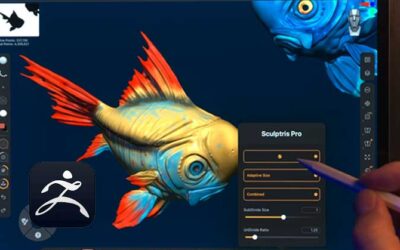
ZBrush for iPad has quickly become a standout tool for artists, bringing the power of the industry-standard digital sculpting app to Apple’s portable device. Developed by Maxon, this is not just a port of its desktop counterpart,

read more
Sometimes A Mentor Is All You Need

Sometimes A Mentor Is All You Need

In the realm of 3D modeling, animation, and visual effects, choosing the right software can significantly impact the quality, efficiency, and outcome of your projects. Two prominent contenders in this field are Cinema 4D, developed by Maxon, and Blender, an open-source powerhouse.

read more
Prompts To Make Ai Think. Better.

Prompts To Make Ai Think. Better.

In the realm of 3D modeling, animation, and visual effects, choosing the right software can significantly impact the quality, efficiency, and outcome of your projects. Two prominent contenders in this field are Cinema 4D, developed by Maxon, and Blender, an open-source powerhouse.

read more
Why You Might Choose Cinema4D Over Blender

Why You Might Choose Cinema4D Over Blender

In the realm of 3D modeling, animation, and visual effects, choosing the right software can significantly impact the quality, efficiency, and outcome of your projects. Two prominent contenders in this field are Cinema 4D, developed by Maxon, and Blender, an open-source powerhouse.

read more

Comments

0 Comments

Submit a Comment

This site uses Akismet to reduce spam. Learn how your comment data is processed.